![vCreative_Logo_RGB.png]](https://vcreativeinc.com/hs-fs/hubfs/vCreative_Logo_RGB.png?width=200&height=38&name=vCreative_Logo_RGB.png)
Enhancements & Improvements
Improved duplicate Cart ID warnings in Quick Order
Previously, duplicate Cart ID warnings could be overlooked or were not clearly associated with the Cart ID field. This has been improved so warnings are now persistent, directly tied to the Cart ID field, and provide clearer guidance—allowing users to quickly identify and resolve duplicates before submitting an order.
When Cart ID rules are configured for a station, the system will automatically check any entered Cart ID against existing records for that station. If a duplicate is detected, a warning modal—“Duplicate Cart ID Found”—will appear.
The warning includes a clear explanation of the issue along with key details from the conflicting order(s), helping users understand the overlap.
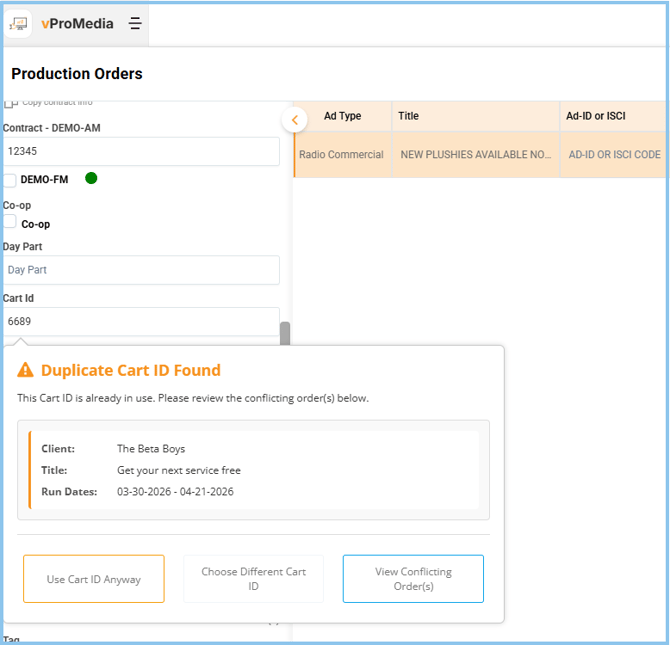
Available actions:
- Use Cart ID Anyway – Allows users with override permissions to proceed despite the duplicate
- Choose Different Cart ID – Returns to the Cart ID field to enter a new value
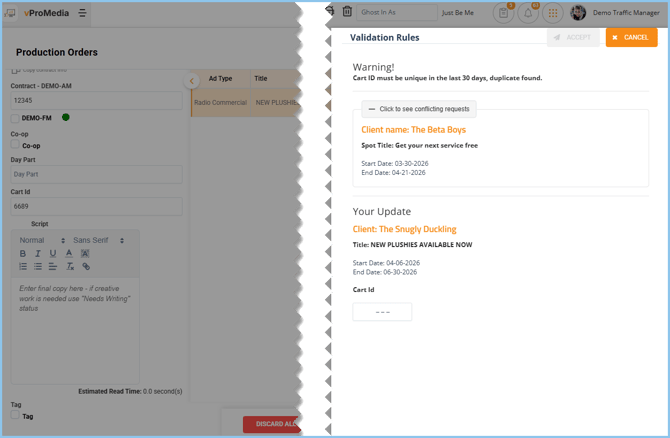
- View Conflicting Orders – Opens a panel to review all orders associated with the duplicate Cart ID and allows replacing the Cart number or, with permissions applying the duplicate anyway
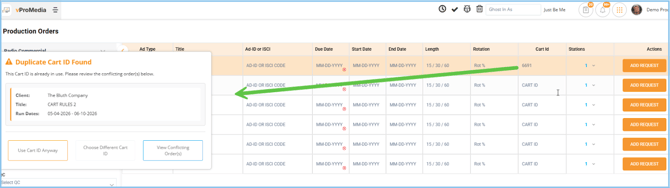
Cart numbers can also be entered from the right-side summary line. Duplicate detection will still occur as long as a station is selected.
Resolved Issues Impacting Order Reliability, Integrations, and User Experience
Order & Workflow Issues
- Ad types not available / selectable in forms
Some users were unable to select ad types when creating or editing orders. This has been fixed so all valid ad types now load and can be selected properly. - Multiline orders and drafts displaying incorrect data
Orders with multiple lines sometimes showed extra line items. Data handling has been corrected so all order lines now display accurately. - Spots not unlocking after Quick Order close or Searching
Spots could remain locked after closing the Quick Order without saving or when clicking to search for an order. This has been resolved and spots now unlock as expected. - Stations pre-selected incorrectly on new orders
New orders sometimes auto-selected incorrect stations from previously submitted orders. Station selection logic has been fixed to reflect the correct defaults.
File & Media Handling
- .mxf file upload issues
Certain video files failed to upload or process. File handling has been improved to support these formats reliably. - WAV file playback issues
Some audio files would not play correctly. Playback functionality has been fixed to ensure consistent audio preview. - Voice parts being incorrectly created or attached
Spots were being created with unintended voice parts. This has been corrected so voice parts are only added when expected.
UI / Display Issues
- Scrolling issues in blog or modal windows
Users experienced difficulty scrolling within certain windows. Scrolling behavior has been fixed for smoother navigation. - Dropdowns not functioning properly (e.g., Send Email)
Dropdown menus were not consistently opening or selecting values. These components have been stabilized. - Script printing issues
Scripts were not formatting or printing correctly. Printing logic has been corrected for proper output. - Station/market selection UI errors
Selection boxes were not displaying or behaving correctly when selecting a station or a group of stations. UI fixes ensure accurate and usable selection controls.
Data Sync & Integration Issues (vPPO / Marketron / Traffic)
- Draft order mismatches between systems
Drafts were not aligning correctly between vProMedia and external systems. Sync logic has been improved for accurate matching. - Duplicate clients created during sync
Client sync processes occasionally created duplicates. This has been fixed to prevent duplication.
Data Accuracy & History
- RDS / CART ID / image history inconsistencies
Historical data related to RDS (Quu), CART IDs, and images were not always accurate. Data tracking has been corrected.
For any questions or feedback, please reach out to our dedicated help desk.
Thank you for your continued support!