![vCreative_Logo_RGB.png]](https://vcreativeinc.com/hs-fs/hubfs/vCreative_Logo_RGB.png?width=200&height=38&name=vCreative_Logo_RGB.png)
A quick summary of the most notable changes in this release.
- New AI Spot Import enhancements & AI-generated title and script recommendations
- Customizable export options
- Improved production email notifications
- Three customer-reported issues resolved
 NEW AI Features - These features are available as part of the vCreative AI Suite. AI features require an AI subscription and are not enabled by default. Interested? Reach out to sales@vcreativeinc.com for more information.
Introducing AI for vProMedia
Take the manual work out of production order entry with intelligent tools designed to help your team work faster, reduce repetitive tasks, and maintain consistency.
AI Content Selection
Users can now choose to accept the AI-generated title, script, or both, giving them more control over what gets added to the order.
AI Spot Suggestions
Continued improvements to AI-generated spot recommendations to produce more creative and relevant content based on available client history.
AI Usage Notifications
Added support for notifying users when AI usage limits are reached.
Email to Order Improvements
Enhanced Email to Order with improved spot groupings and additional integration settings to better support automated order creation.
Interested in AI?
These are just a few of the AI capabilities currently available in vProMedia. If you'd like to learn how AI can help your team save time and streamline production workflows, contact us at sales@vcreativeinc.com.
New Features Available Upon Request
The features below are available but are not enabled automatically. If you're interested in using one of these features, please contact Support for assistance.
Extend Workflow Notes
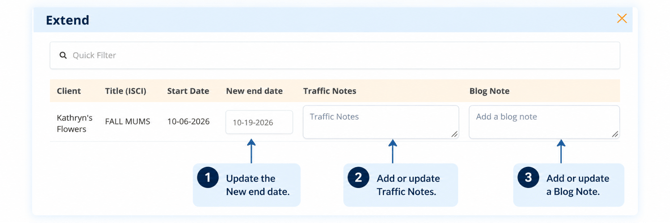
The Extend workflow now supports adding Traffic Notes and Blog Notes directly from the Extend screen, making it easier to communicate important information as part of the extension process.
Users can add a Traffic Note, a Blog Note, or both while entering the new end date, eliminating the need to return to the order separately to add those details..
On-Demand Transcripts
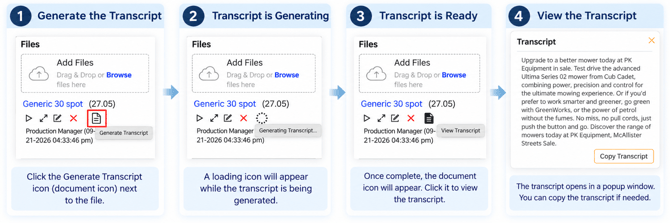
Need to quickly see what’s in an audio or video file without listening to the entire recording? You can now generate a transcript from any attached audio or video file directly within vProMedia.
Once generated, the transcript can be viewed and copied right from the order making it easy to review spoken content, reference copy, or grab the text you need in seconds.
Corporate Label List
Multi-market organizations can now use a shared Corporate Label List, giving all child firms access to the same standardized labels instead of maintaining separate lists by market.
When enabled, the corporate labels are available when creating orders and when searching by Label, making it easier to organize and find orders consistently across the organization.
Note: This feature is available for organizations already using Labels and requires configuration by vCreative Support.
Issues Resolved
The following issues have been corrected in this release.
Voice Part Downloads
Addressed issues with downloading voice parts.
Script File Downloads
Resolved an issue that could prevent script files from downloading successfully.
Account Registration
Resolved an issue that could prevent users from successfully registering new accounts when phone extensions are included.
File Upload Confirmation
Improved file upload handling so files are not shown as successfully uploaded until storage confirmation is received.
People View Role Sorting
Fixed sorting for the Role column in the People view.
Job Field Indicators
Corrected inconsistent orange field outlines in the Quick Order forms to provide clearer visual feedback for required fields.
For any questions or feedback, please reach out to our dedicated help desk.
Thank you for your continued support!