![vCreative_Logo_RGB.png]](https://vcreativeinc.com/hs-fs/hubfs/vCreative_Logo_RGB.png?width=200&height=38&name=vCreative_Logo_RGB.png)
Search by Uploaded File Name
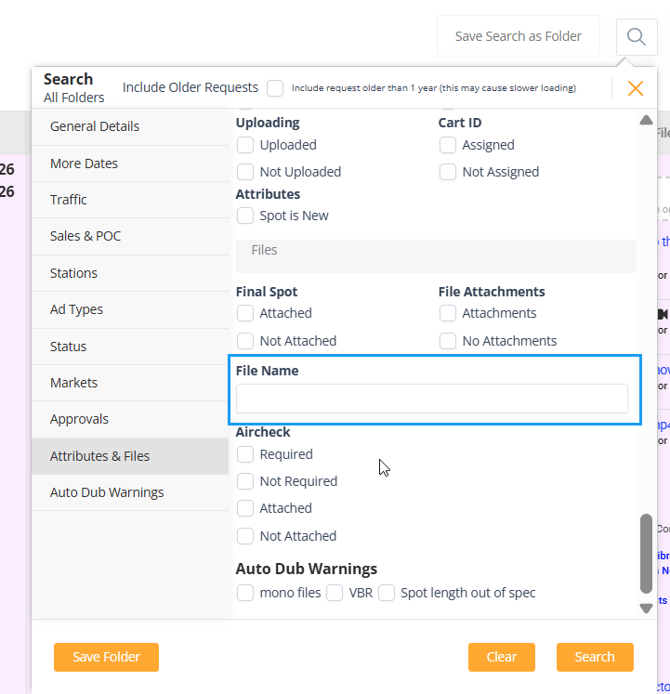
vProMedia allows users to search for production requests using the original name of a file uploaded to the request. This is useful when you know the name of an audio file, script, image, or other uploaded asset but do not know the client, request name, contract number, or other details associated with the request.
How to Search by File Name
- Open the Search panel in vProMedia.
- Navigate to Attributes & Files.
- Locate the File Name field.
- Enter the full file name or part of the file name.
- Review the search results for requests associated with the matching uploaded file.
You do not need to know the entire file name. vProMedia can search using part of the original uploaded file name.
How This Helps
This search option provides another way to locate existing production work when the file itself is the information you have available.
For example, if someone sends you an audio file name and asks which request it belongs to, you can search for that file directly instead of trying to identify the request by client, dates, contract information, or spot details.
This can help:
- Locate requests associated with known production assets.
- Reduce time spent searching through clients or folders.
- Find older work when only a file name is available.
- Connect an uploaded asset back to the production request where it was originally used.
If you have any questions regarding this process, please feel free to reach out to the vCreative support team by emailing support@vcreativeinc.com or calling 800-605-9889.