![vCreative_Logo_RGB.png]](https://vcreativeinc.com/hs-fs/hubfs/vCreative_Logo_RGB.png?width=200&height=38&name=vCreative_Logo_RGB.png)
Overview
Once the Marketron Advertiser Integration is enabled, users should only be using clients that are properly entered into the Marketron system and sync’d throughout the day versus entering clients into their vPPO
account. Prior to going live with this integration a Client Merge exercise will be necessary per market.
Client Merge
Users with certain abilities will be able to see the “Client” list in their vPPO account by clicking on
“Maintenance>Clients”. Clients that are highlighted in a green color have been synced with Marketron and these are the clients all users should see when entering orders, if there are clients that are not highlighted in green they need to be merged:
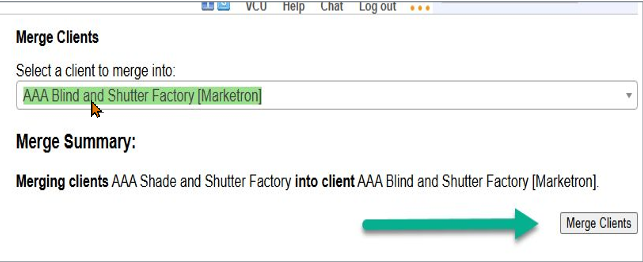
Step 1 - In the example below, the AAA Shade and Shutter will need to be merged into AAA Blind and Shutter Factory [Marketron]:

Step 2 - Click on the non-highlighted Client you would like merged into the Marketron Client, this can be a multi select as well. “Select a client to Merge into”, this is where you search by the Marketron client, under “Merge Summary” vPPO will give you the options of clients you want to merge into, click “Merge Clients” to complete the merge.