![vCreative_Logo_RGB.png]](https://vcreativeinc.com/hs-fs/hubfs/vCreative_Logo_RGB.png?width=200&height=38&name=vCreative_Logo_RGB.png)
Single and Completed Line Submission on Multi-Line Draft Orders - vPPO customers can now submit individual spots OR all completed spots on a production order, even if the order contains incomplete items. When spots are ready, submit them into the workflow while incomplete line items remain in your Drafts for future updates.
How it works
Option 1 - Submit a single spot:
- Open your Draft order. This includes everything in Drafts, WideOrbit Drafts, Marketron Drafts, or other traffic system draft folders or an order just manually created.
- Within the Production Order, click the Submit Spot button for the specific line item you want to process.
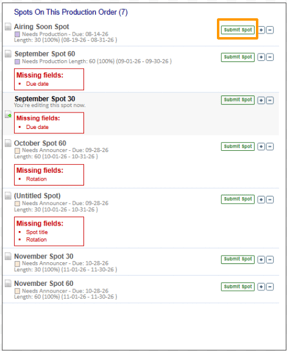
- You will receive a confirmation message indicating that you are submitting only this spot and all others will remain as Drafts.
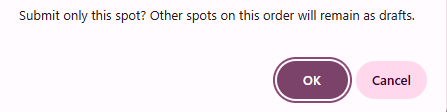
- If the selected spot is missing required fields, you are notified of missing fields and the selected spot remains in a Draft state.
Option 2 - Submit all completed spots on the Production Order:
- Click the Submit button at the top or bottom of the screen to submit all ready-to-process spots. The hover text on these buttons is updated to reflect the new functionality.
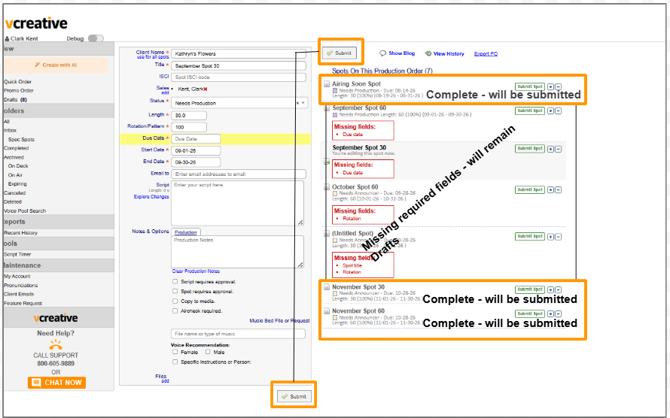
Regardless of the option you choose, submitted spots will appear in your MyBox folder, while incomplete or not selected spots on the Production Order will remain in the appropriate Drafts folder.
Why it helps
This update prevents large, multi-line orders (such as multi-month digital insertion or traffic system contract Drafts) from blocking your workflow. You can now submit urgent spots immediately without waiting for future line items to be finalized.
If you have any questions regarding this process, please feel free to reach out to the vCreative support team by emailing support@vcreativeinc.com or calling 800-605-9889.