![vCreative_Logo_RGB.png]](https://vcreativeinc.com/hs-fs/hubfs/vCreative_Logo_RGB.png?width=200&height=38&name=vCreative_Logo_RGB.png)
We’ve enhanced vPPO Search to make it easier to locate orders that are still in Draft status, including standard vPPO Drafts, WideOrbit Drafts, and Marketron Drafts.
The Attributes & Files > Spot Type section now includes two new search options:
- Drafts Only – Limits your search results to draft orders.
- Include Drafts – Includes draft orders along with other matching orders in your search results.
How it works
- Click on the Search button

- Enter the Client Name
- Scroll down to the section titled Attributes & Files
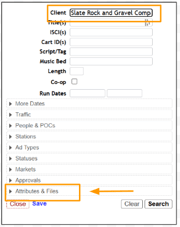
- Expand Attributes & Files and in the Spot Type section, select whether you would like to search for Drafts Only or if you would like to Include Drafts in your search.
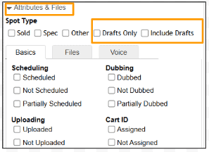
Important to Note: Because draft orders may not yet contain many of the fields normally used by Search, we recommend using only the Client Name when searching with either Draft option. Adding additional search criteria may prevent the draft from appearing in your results.
Why It Helps
As Draft folders grow, finding a specific order can become time-consuming. These new search options allow you to quickly locate a Client’s drafts using the familiar vPPO Search tool without manually scanning through hundreds of entries.
If you have any questions regarding this process, please feel free to reach out to the vCreative support team by emailing support@vcreativeinc.com or calling 800-605-9889.