![vCreative_Logo_RGB.png]](https://vcreativeinc.com/hs-fs/hubfs/vCreative_Logo_RGB.png?width=200&height=38&name=vCreative_Logo_RGB.png)
New Features
- vPPO now offers a new search filter for Add Voice assignments in Quick Orders to allow Production Managers to easily locate orders where a voice request has been added.
Issues Resolved
- This release corrects an issue for users with "Cloud" ability to search by station type. (Terrestrial, Stream, or TV). Previously, some station types were not recognized in this search filter.
New Option to Search by Voice Added
What’s new
vPPO now offers an added search filter to include Add Voice assignment so that Production Managers can easily locate orders with an Add Voice request to determine which are completed and which remain outstanding.
How it works
- In the Search tool, click the Attributes & Files menu.
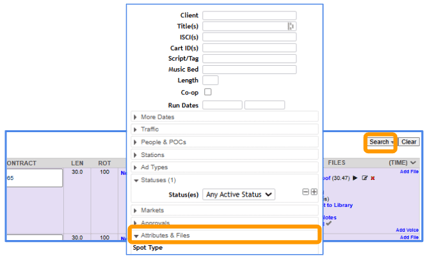
- Click the new "Voice" tab.
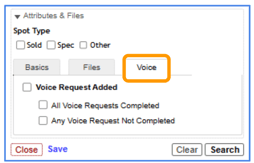
- Select the "Voice Request Added" box. Two additional sub-filters appear to narrow the search criteria to completed or not completed requests.
-
- To search for spots with completed voice requests, click the All Voice Requests Completed check box.
- To search for spots with voice requests that are not completed, click the Any Voice Requests Not Completed check box.
-
- Strongly Recommended: Narrow the search further using the Status Filter
- For example, depending on your market workflow, Needs Production or Needs Announcer status will narrow down results presented.
- Strongly Recommended: Narrow the search further using the Status Filter
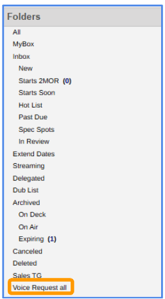
- Save the search if it will be reused. As with other saved searches, the named search will appear as a folder in the left navigation menu.
Why it helps
-
Streamlines workflow to allow Production Managers to search specifically for voice requested spots and access their status
Need help?
To learn more or if you have any questions, contact the vCreative Help Desk.