![vCreative_Logo_RGB.png]](https://vcreativeinc.com/hs-fs/hubfs/vCreative_Logo_RGB.png?width=200&height=38&name=vCreative_Logo_RGB.png)
New Option to Link SPECai & vCreative Accounts
What’s new
SpecAI enabled markets have a new functionality that will allow SpecAI to remember your login information so you are not prompted to log in each time.
How it works
For customers who work with SpecAI, starting today, when you click the SpecAI link in your list view, you will receive a pop up asking how you want vPPO and SpecAI to communicate login information going forward:
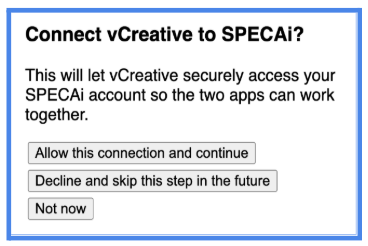
- Allow this connection and continue (RECOMMENDED): Opens a pop up from SPECai asking you to ALLOW the link between vPPO and SPECai.

If you ALLOW, you have successfully created a connection between SPECai and vCreative and will not be prompted to log in again when moving from vPPO to SPECai.
NOTE: When the connection is completed, you may need to search for your spot again, and click SPECai to continue your work.
- Decline and skip this step in the future: Opens the login screen for SPECai for you to log in manually (or if already logged in, will take you to SPECai).
Going forward, this selection will require you to log into SPECai each time you click a SPECai link, as you do now.
- Not Now: Defers making a choice until the next time a SPECai link is clicked - The SpecAI login screen appears and allows you to manually log in (or if already logged in, will take you to SPECai).
The next time you click a SPECai link in vPPO, you will be prompted with the three connection options again and may either allow the connection, decline the connection, or defer your selection until later.
You can also access this feature from inside the Quick Order by selecting the SPECai logo and receive the same options and functionality.
Scope & limitations
-
This feature is available only to firms enabled for SPECai.
Why it helps
- Depending on your firm’s security policies, can eliminate the need to log into SPECai from vPPO links.
Need help?
To learn more or if you have any questions, contact the vCreative Help Desk.