![vCreative_Logo_RGB.png]](https://vcreativeinc.com/hs-fs/hubfs/vCreative_Logo_RGB.png?width=200&height=38&name=vCreative_Logo_RGB.png)
-
Headings added for Saved Searches and Traffic Integration Drafts Folders
-
Option to Hide Specific Marketron Integration Clients
What’s new
Headings in Drafts and Saved Search Views
The name of the folder in saved searches and in traffic integration Drafts folder are now prominently displayed as a heading in the list view of the folder.
How it works
For customers who have created saved search folders OR for firms where traffic integration is turned on, click on your custom Saved Search folder, Marketron Drafts or Wide Orbit Drafts folder. When the list view displays, the name of the folder is shown as a heading in the list view. No configuration or settings are necessary for this feature.
Saved Search Folder display:
Traffic Integration Drafts Folder display: 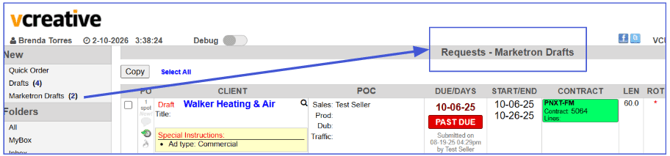
Why it helps
- Reduces confusion as to which POs are being viewed in the list
- Adds consistency to the headings displayed in the list view of all folders.
Hide Client Feature Enabled for Marketron Integration
Where Marketron traffic integration is enabled, Local Admins are able to hide individual or multiple clients that should not be used on new Production Orders. Hidden clients can be unhidden if it is determined that they should be available for use. There is no impact to the Marketron traffic system’s advertisers based on a Client being hidden or visible in vPPO.
How it works
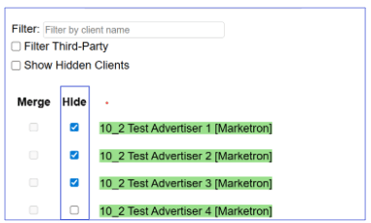
- A new Hide checkbox has been added to the Client List to the right of the Merge checkbox.
- Customers can select the Hide checkbox for individual or multiple clients. Hidden advertisers are not available on new Production Orders.
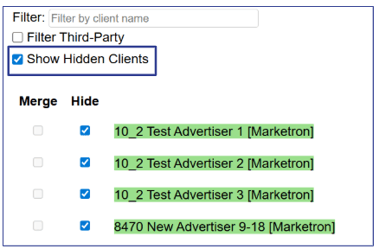
- To see Hidden Clients only, select the Show Hidden Clients checkbox. The list is then limited to Clients currently hidden. The customer can deselect any which need to be visible.
Scope & limitations
- This feature is available only to markets that have Marketron Integration enabled.
- The Hide checkbox is only visible inside vPPO under Maintenance>Clients and requires access to this section of the software.
Why it helps
- Allows customers with access to manage Clients in vPPO Maintenance to remove variations of the same client which should not be available to sellers from being selected.
- Enables a view of only hidden clients for easy identification and, if necessary, removal of the Hide selection.
Need help?
To learn more or to enable the feature for your firm, contact the vCreative Help Desk.