![vCreative_Logo_RGB.png]](https://vcreativeinc.com/hs-fs/hubfs/vCreative_Logo_RGB.png?width=200&height=38&name=vCreative_Logo_RGB.png)
On the Calendar page, you can see all PRFs created by anyone in your market. The My PRFs tab displays only the PRFs associated with you, making it easy to see which promotions are coming up.
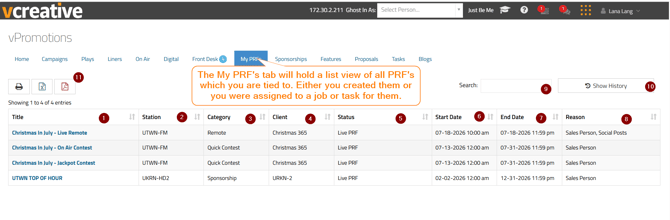
Here are some details to note on the My PRFs tab:
- Title: The title of the PRF. The title is also a link. Click it to open the PRF’s details view.
- Station: The station for which the PRF was created.
- Category: The PRF’s category, which helps you identify the type of promotion.
- Client: The name of the client for whom the PRF was created.
- Status: The PRF’s current status.Statuses may include:
- Live: The PRF has been fully approved.
- Pending Approval: The role responsible for the pending approval will also be listed so you know whom to follow up with, if necessary.
- Draft: Salespeople can save PRFs as drafts when they are not ready to submit them. To continue working on a draft, click its title. You can then complete and submit it.
- Canceled: The PRF was canceled.
- Deleted: The PRF was deleted.
- Start Date: The date and time the promotion begins.
- End Date: The date and time the promotion ends.
- Reason: The Reason column explains how you are associated with the PRF. For example, if you created the PRF, you may be listed as the salesperson. If you were assigned a job or task for the PRF, the name of that job or task will appear in this column.
- Search: Use the Search field to quickly find a PRF in your list by title, station, client, category, date, or reason.
- Show History: Click this button to view PRFs for promotions that have already taken place. The History view also includes a Search field.
- Print and Export Options: You can print the page or export the information to an Excel or PDF file.
Note: All columns listed in items 1–8 are sortable.
If you have any questions, please contact the vCreative Support Team by emailing support@vcreativeinc.com or calling 1-800-605-9889.