![vCreative_Logo_RGB.png]](https://vcreativeinc.com/hs-fs/hubfs/vCreative_Logo_RGB.png?width=200&height=38&name=vCreative_Logo_RGB.png)
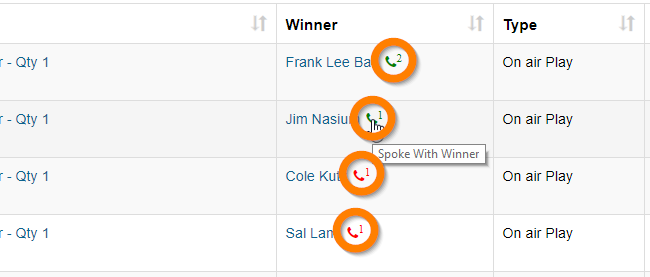
Tell at a glance which winners have been contacted right on the Details / Plays tab!
Promotions and Program Directors can easily track your calls to winners regarding prize pick-up right there on the Plays screen.
- The phone icon is green if that winner was reached or if a voicemail was left with them.
- The phone icon is red if that winner was not reached due to no voicemail or bad number.
- The number next to the phone icon tells you how many attempts have been made.(Maximum 3)
By mousing over the phone icon, you can see more details. Click on the icon to note another contact attempt.