![vCreative_Logo_RGB.png]](https://vcreativeinc.com/hs-fs/hubfs/vCreative_Logo_RGB.png?width=200&height=38&name=vCreative_Logo_RGB.png)
The Endorsements Module Talent Search is a helpful tool for finding which talent would be best for your Endorsement spot without having to contact the talent directly to get an answer.
Here's how it works:
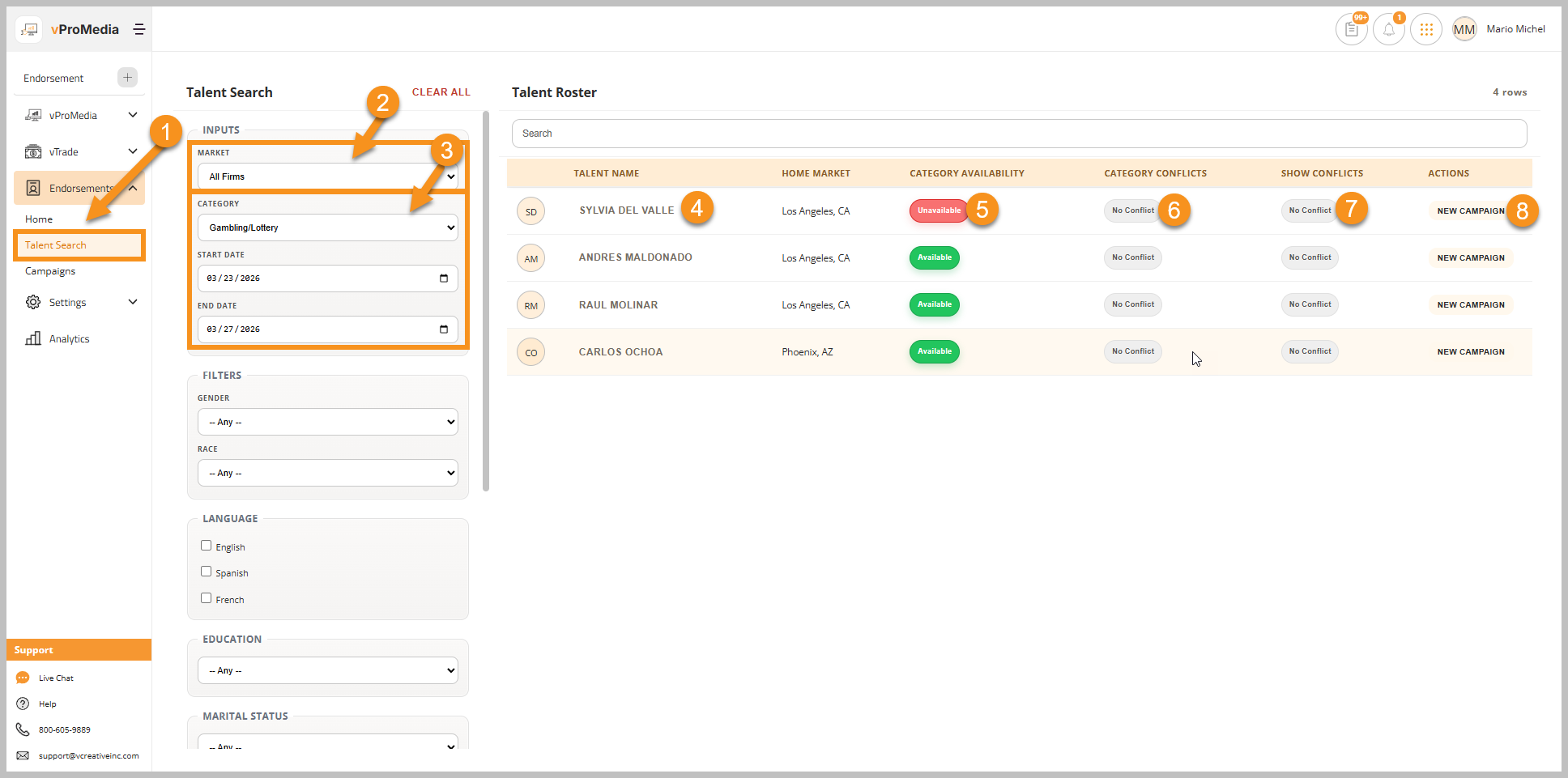
- Click Talent Search in the Left Navigation Menu in Endorsements.
- Once open, you can select the market in which your Campaign will air.
- Next select the client Category and Run Dates that you would like to search. You can also narrow the field by selecting additional criteria in the left panel of the Talent Search.
- You can click on the talent's name to open the Talent Profile to see more information about what endorsements the Talent is currently doing, when they end, etc.
- If a Talent has a specific category blocked, you'll see that in red under Category Availability.
- If the Category Conflicts button is red, that means the talent already has an endorsement in the same category as your client during that time period.
- If the Show Conflicts button is red, that means a talent on the same show already has an endorsement in the same category as your client during that time period.
- Click New Campaign to start a new Campaign for with that Talent as the Endorser.