![vCreative_Logo_RGB.png]](https://vcreativeinc.com/hs-fs/hubfs/vCreative_Logo_RGB.png?width=200&height=38&name=vCreative_Logo_RGB.png)
Search by Uploaded File Name
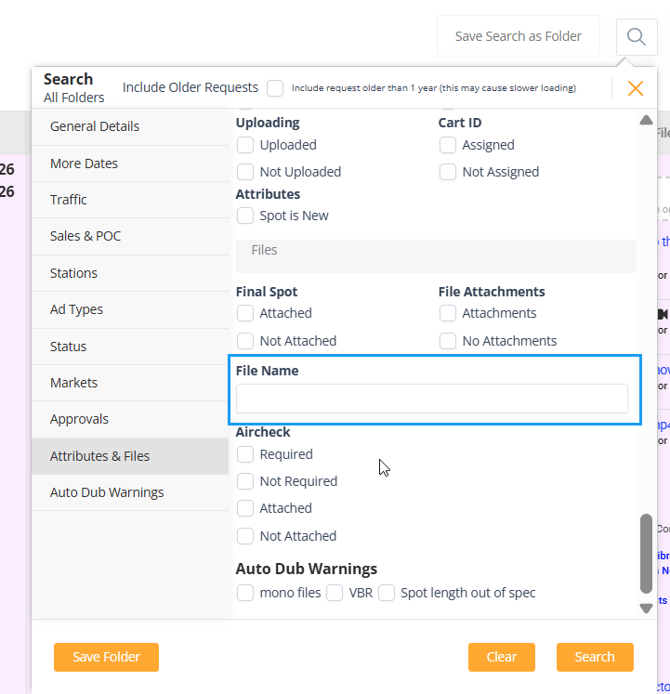
Finding existing production assets is now easier. You can now search for requests using the original uploaded file name, making it simple to locate requests when you know the file name but not other request details.
To use this feature, open the Search panel, navigate to Attributes & Files, and enter the file name (or part of the file name) in the File Name field. This helps you quickly find requests associated with a specific uploaded file.
Fixes
User Experience & Navigation
-
Fixed an issue where folder sorting was not displaying in the expected order.
-
Fixed an issue causing the "up arrow" behavior in the production notes slide out to navigate between sections. Now the up arrow will navigate to the previous line of text.
-
Fixed an issue where keyboard navigation would unexpectedly move focus to the file drag-and-drop area after tabbing from the status field.
-
Fixed an issue where Extend Date notification emails were being sent even when the related setting was disabled.
Behind-the-Scenes Improvements
-
Database and infrastructure updates were implemented to support upcoming AI functionality, improve scalability, and strengthen platform performance.
These updates are designed to improve day-to-day workflow efficiency, system stability, and overall user experience across vProMedia.
For any questions or feedback, please reach out to our dedicated help desk.
Thank you for your continued support!