![vCreative_Logo_RGB.png]](https://vcreativeinc.com/hs-fs/hubfs/vCreative_Logo_RGB.png?width=200&height=38&name=vCreative_Logo_RGB.png)
Now vPPO has an alternative method for selecting client names during order entry. As you enter the client name, our standard search method looks for “similar” names. For vPPO firms with large advertiser databases this type of search may not return certain letter combinations. With the new search option, you can select “Starts With” to match exactly to the first few letters of the client name.
How it works
- This is a firm setting. A Local Admin or the vCreative Help Desk can turn it on via a check box in the firm settings.
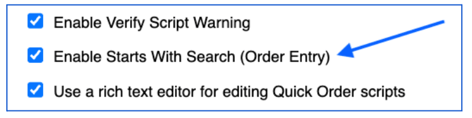
- With this firm setting enabled, during order entry, the user will see a new “Starts with search” checkbox.

- By checking this box, the user will see an exact match for the letters entered in the Client field
Scope & Limitations
- With this new setting enabled, you get the benefit of either search method when selecting a client during order entry.
- Firms with large client databases will find this beneficial
Why it helps
- This gives you the ability to search by similar client names, or exact client names
To learn more please contact the vCreative Help Desk via Live Chat, or 800-605-9889, or support@vcreativeinc.com.