![vCreative_Logo_RGB.png]](https://vcreativeinc.com/hs-fs/hubfs/vCreative_Logo_RGB.png?width=200&height=38&name=vCreative_Logo_RGB.png)
Summary
Training session covered vProMedia search tool functionality and filtering capabilities for order retrieval. Even deleted orders will always remain in the system and are searchable.
Search Tool Functionality
The vProMedia search tool facilitates locating orders and associated files using a microscope icon interface. Users can filter results by client name, identifiers, and specific date parameters.
Advanced Filtering Options
Filtering capabilities extend to traffic assignments, station access, and ad types. The system enables searching by order status, including archived or deleted items, and market-specific criteria.
Attributes and Execution
Users can further refine searches by scheduling, dubbing status, and file attachments to identify specific spot types. Final search execution requires inputting parameters before viewing the results list.
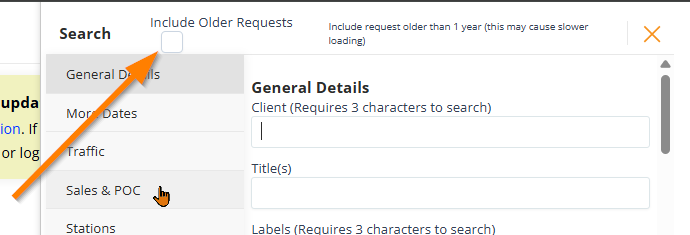
NOTE: If you are looking for a spot which may have been entered over a year ago, please include the 'Include Older Requests' option in vProMedia.
Details
- vProMedia Search Tool Purpose: The search tool in vProMedia is designed to help users locate orders and any files attached to them, including spots that ran in the past.
- Accessing the Search Tool and General Details: The search tool is located on the right side of the screen and is represented by a microscope icon. Clicking this icon opens a popup box where users can filter by general details, including client name, title, ISKY, or card ID.
- Searching by Dates, Traffic, and Sales: Users can refine their searches using various date parameters, such as active, due, start, end, and archive dates. Additionally, the traffic section allows for searching by contract ID or line number, while the sales and PO section enables filtering by the specific person who created the production.
- Filtering by Assignments, Stations, and Ad Types: The tool allows users to search based on individuals assigned to specific jobs or POC assignments. Furthermore, users can filter by the specific stations to which they have access and by defined ad types.
- Filtering by Order Status, Market, and Approvals: The search criteria include the status of an order, noting that even deleted orders remain within vProMedia. For those with access to multiple markets, the tool allows for market-specific searching, as well as filtering by approval status for both spots and scripts.
- Attributes, Scheduling, and Dubbing Status: Users can utilize the attributes and files section to differentiate between sold spots and spec or creative-only spots. The tool also provides options to search by scheduling status, including whether a spot has been dubbed or uploaded.
- File Options, Search Execution, and Support: The tool allows users to filter by whether a final spot has been attached to an order or check for autodub warnings if the market uses that feature. To execute a search, users input parameters, such as a client name like the "Bluth company," and click the search tool to view results.
If you have any questions regarding this process, please feel free to reach out to the vCreative support team by emailing support@vcreativeinc.com or calling 800-605-9889.