![vCreative_Logo_RGB.png]](https://vcreativeinc.com/hs-fs/hubfs/vCreative_Logo_RGB.png?width=200&height=38&name=vCreative_Logo_RGB.png)
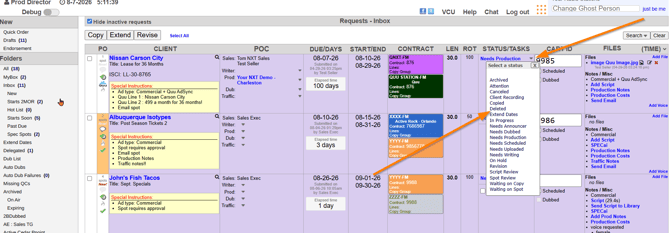
First, find the order you need to delete by looking in one of your folders or finding it via the search tool.
Then, in the Status/Tasks column, click on the small down arrow you see next to the current status and choose deleted.
Note that if the Order is a Spec rather than a sold spot, choose the Canceled option instead.
Also note that all orders, even deleted orders, will still remain in the database and you can still find them using the search tool. However deleting the order will remove it from an active stage and will drop from active views.
Users who have the email notification turned on to receive an email when an order is deleted will also receive an email notification if the delete action is taken.
If you have any questions regarding this process, please feel free to reach out to the vCreative support team by emailing support@vcreativeinc.com or calling 800-605-9889.