![vCreative_Logo_RGB.png]](https://vcreativeinc.com/hs-fs/hubfs/vCreative_Logo_RGB.png?width=200&height=38&name=vCreative_Logo_RGB.png)
How it works
For customers who have created saved search folders OR for firms where traffic integration is turned on, click on your custom Saved Search folder, Marketron Drafts or Wide Orbit Drafts folder. When the list view displays, the name of the folder is shown as a heading in the list view. No configuration or settings are necessary for this feature.
Saved Search Folder display:
Traffic Integration Drafts Folder display: 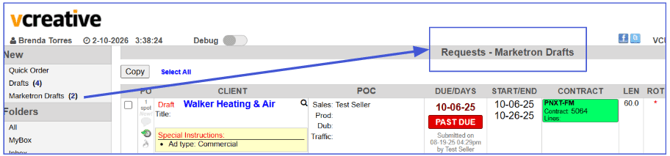
Why it helps
- Reduces confusion as to which POs are being viewed in the list
- Adds consistency to the headings displayed in the list view of all folders.
If you have any questions regarding this process, please feel free to reach out to the vCreative support team by emailing support@vcreativeinc.com or calling 800-605-9889.