
Steps to View Unsubscribe Numbers
- Log into PromoSuite Mail
- Access your PromoSuite Mail account.
- Run the Unsubscribe Report
- Navigate to Run A Reports
- Select Unsubscribe Summary
- Select a Date Range
- Enter your desired date range (example: 01/01 – 12/31)
- Click Submit
Understanding the Results
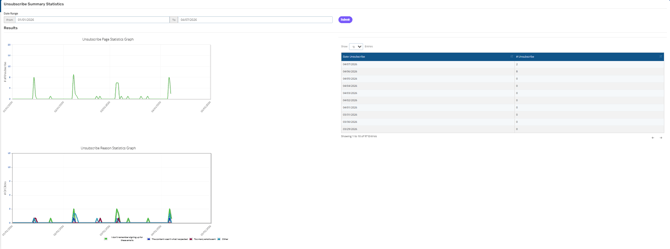
Once the report is generated, you will see:
- Unsubscribe Page Statistics Graph – Displays unsubscribe activity over time
- Unsubscribe Reason Statistics Graph – Shows trends based on unsubscribe reasons
- Daily Unsubscribe Counts – A breakdown of unsubscribes by date
Viewing Unsubscribe Details (Names & Emails)
To view individual unsubscribe records:
- Click on a specific date within the report results
- This will display a list of:
- Names
- Email addresses
- Associated unsubscribe details including date & time
Important Notes
- Download Not Available:
At this time, there is no option to download unsubscribe data directly from PromoSuite Mail. - Requesting a Download:
Our Programming team is currently working on adding this feature.
In the meantime, please submit a request to Support if you need this data exported. The information will need to be pulled from the back end.