
Quick Pick-Up is designed to speed up the prize redemption process when winners arrive at your station or event. Instead of searching through the Listener Database or Winner Dashboard, you can quickly locate the winner, process their prize, capture signatures (if required), and complete the distribution in just a few clicks.
Accessing Quick Pick-Up
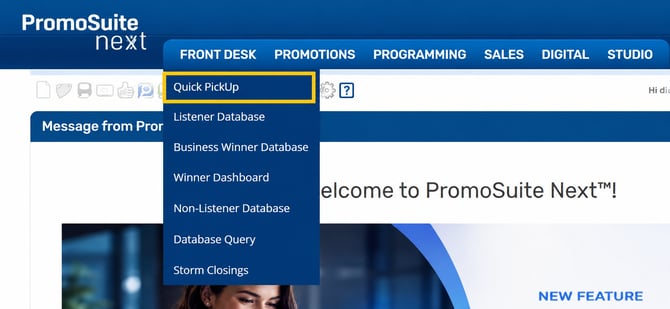
- From the main menu, navigate to:
Front Desk > Quick Pick-Up - The Quick Pick-Up screen will open.
-
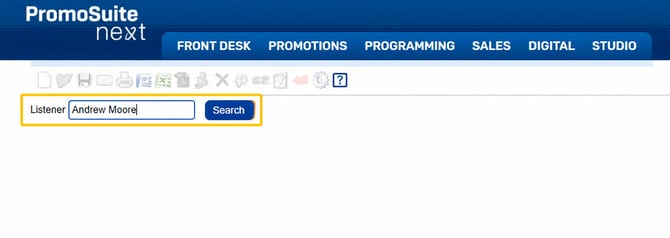
You can locate a winner by searching for:
- First Name & Last Name
- Select the correct winner from the list.
Processing Prize Pick-Up
After selecting the winner, you'll be taken to the Distribute Prize screen where you can:
- Confirm the prize being picked up
- Review and/or Send any outstanding paperwork
- Mark the prize as distributed
Winner Release Form (If Required)
-
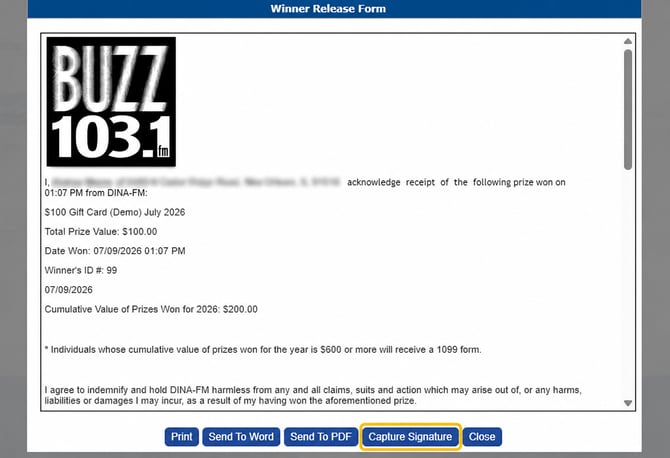
Click Winner Release Form.
-
Select Capture Signature.
-
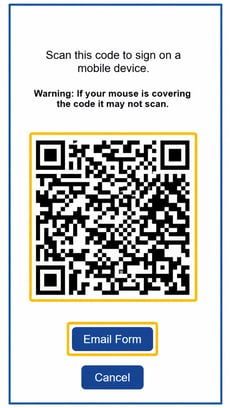
Choose one of the following options:
-
Email – Click the Email button to send the Winner Release Form directly to the winner.
-
QR Code – Display the QR Code for the winner to scan and complete the form on their mobile device.
-
-
Once the winner completes and signs the form, the completed signature will automatically appear in PromoSuite Next for the radio station to review and approve before it is saved to the winner's record.
Tips & Best Practices
✔ Verify the winner's identity before releasing the prize.
✔ Ensure all required Winner Release Forms and W-9s (if applicable) have been completed.
✔ Use QR Code signatures whenever possible to speed up the pickup process.
✔ Double-check the prize before clicking the Save Button to Distribute Prize, as this action updates the winner's history.