---
title: How To Customize User Permissions
description: If a PromoSuite Next user requires a set of permissions not defined in our pre-defined User Groups - a local market administrator can always create a custom permissions "profile" and apply it to one
---
[Skip to content](https://vcreativeinc.com/knowledge-promosuite/hc/en-us/articles/360060477172-how-to-customize-user-permissions#main-content)
[](https://promosuite.com/)
- vCreative Products
Show submenu for vCreative Products
- [vPPO](https://vcreativeinc.com/products/vppo)
- [vProMedia](https://vcreativeinc.com/products/vpromedia)
- [vPromotions](https://vcreativeinc.com/products/vpromotions)
- [vTrade](https://vcreativeinc.com/products/vtrade)
- [vEP](https://vcreativeinc.com/products/vep)
- [Endorsements](https://vcreativeinc.com/products/endorsements)
- [vTickets](https://vcreativeinc.com/insights/vcreative-vtickets-powered-by-evvnt)
- [View All](https://vcreativeinc.com/products)
- PromoSuite Products
Show submenu for PromoSuite Products
- [PromoSuite Next](https://vcreativeinc.com/promosuite-next-vcreative)
- [PromoSuite Mail](https://vcreativeinc.com/promosuite-mail-vcreative)
- [Insights](https://vcreativeinc.com/insights)
- Company
Show submenu for Company
- [Integrations](https://vcreativeinc.com/integrations)
- [Team](https://vcreativeinc.com/company/team)
- [Contact Us](https://vcreativeinc.com/contact-us)
Open main navigation
Close main navigation
- vCreative Products
Show submenu for vCreative Products
- [vPPO](https://vcreativeinc.com/products/vppo)
- [vProMedia](https://vcreativeinc.com/products/vpromedia)
- [vPromotions](https://vcreativeinc.com/products/vpromotions)
- [vTrade](https://vcreativeinc.com/products/vtrade)
- [vEP](https://vcreativeinc.com/products/vep)
- [Endorsements](https://vcreativeinc.com/products/endorsements)
- [vTickets](https://vcreativeinc.com/insights/vcreative-vtickets-powered-by-evvnt)
- [View All](https://vcreativeinc.com/products)
- PromoSuite Products
Show submenu for PromoSuite Products
- [PromoSuite Next](https://vcreativeinc.com/promosuite-next-vcreative)
- [PromoSuite Mail](https://vcreativeinc.com/promosuite-mail-vcreative)
- [Insights](https://vcreativeinc.com/insights)
- Company
Show submenu for Company
- [Integrations](https://vcreativeinc.com/integrations)
- [Team](https://vcreativeinc.com/company/team)
- [Contact Us](https://vcreativeinc.com/contact-us)
- [Go to promosuite.com](https://promosuite.com/)
[Go to promosuite.com](https://promosuite.com/)
Welcome to the PromoSuite Help Center!
- There are no suggestions because the search field is empty.
1. [PromoSuite Help Center](https://vcreativeinc.com/knowledge-promosuite?hsLang=en)
2. [PromoSuite Next](https://vcreativeinc.com/knowledge-promosuite/promosuite-next?hsLang=en)
3. [Managing Users](https://vcreativeinc.com/knowledge-promosuite/promosuite-next?hsLang=en#managing-users)
March 9, 2026
# How To Customize User Permissions
[  ](https://vcreativeinc.com/knowledge-promosuite/hc/en-us/articles/360059846011-promosuite-next-user-groups-and-associated-permissions?hsLang=en)
If a PromoSuite Next user requires a set of permissions not defined in our pre-defined [User Groups](https://vcreativeinc.com/knowledge-promosuite/hc/en-us/articles/360059846011-promosuite-next-user-groups-and-associated-permissions?hsLang=en) - a local market administrator can always create a custom permissions "profile" and apply it to one or more users.
If you first need to create the user - start with our post on [How To Create A New User](https://vcreativeinc.com/knowledge-promosuite/hc/en-us/articles/360058743591-how-to-create-a-new-user-account?hsLang=en).
If you are modifying an existing user - continue reading below.
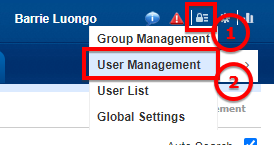
In PromoSuite Next, go to 1) Security \> 2) User Management.
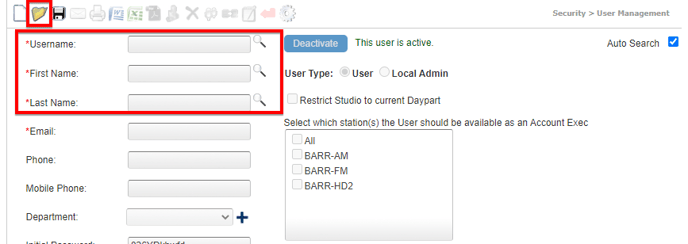
Use the fields on the resulting page to search for a user by username, first name, last name - or - click the "Folder" icon to see a list of available users.
Select the user you wish to modify
Then click 1) "Groups" which shows you the 2) Group assignment for this person, and for which station.
To modify permissions for all stations the user has access to, move on to the next step.
To modify the permissions a user has for one station, select the call letters of the station you wish to modify.

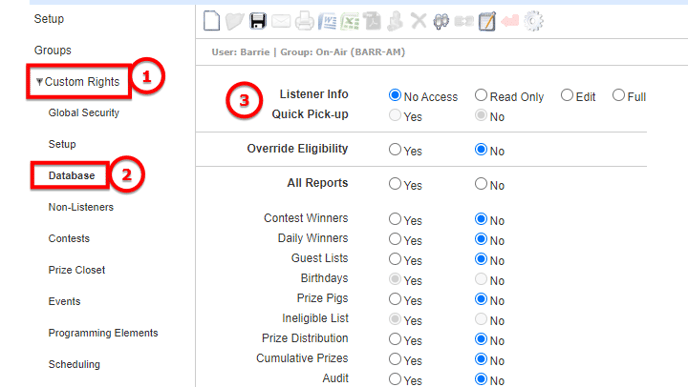
Next, click 1) "Custom Rights" then 2) "Database" and 3) modify the user's permission settings.
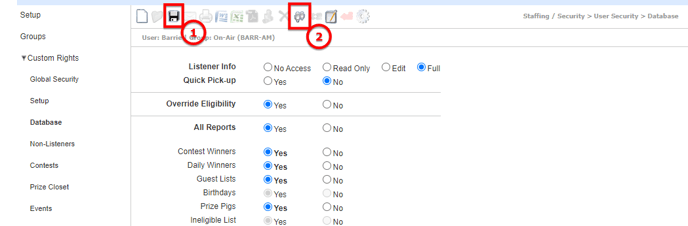
When completed, 1) click to save your selections.
To copy these permission changes to an additional station for which the user has access - 2) click the "Sister Stations" iconselect the stations to apply the changes to.
**NOTES**
- Users can only be assigned to one group.
- Before customizing permissions, consider adding your user to another User Group - read more about groups and permissions in our article [PromoSuite Next User Groups and associated Permissions](https://vcreativeinc.com/knowledge-promosuite/hc/en-us/articles/360059846011-promosuite-next-user-groups-and-associated-permissions?hsLang=en).
- You cannot remove any of the "base" permissions in our pre-defined User Groups; however, you may "add" permissions to a user's assigned User Group, just for that user (when needed).
- A user may need to log out and log back in to see changes to their permissions.
- To make a custom change to an entire User Group you can follow the steps above in Security \> Group Management.
- [PromoSuite Next](https://vcreativeinc.com/knowledge-promosuite/promosuite-next?hsLang=en#main-content)
- [(FAQ) Frequently Asked Questions](https://vcreativeinc.com/knowledge-promosuite/promosuite-next?hsLang=en#faq-frequently-asked-questions)
- [Audience (formerly Aptivada) integrations](https://vcreativeinc.com/knowledge-promosuite/promosuite-next?hsLang=en#audience-formerly-aptivada-integrations)
- [Contact-Free Prize Fulfillment](https://vcreativeinc.com/knowledge-promosuite/promosuite-next?hsLang=en#contact-free-prize-fulfillment)
- [Creating Contests & Prizes](https://vcreativeinc.com/knowledge-promosuite/promosuite-next?hsLang=en#creating-contests-prizes)
- [Events](https://vcreativeinc.com/knowledge-promosuite/promosuite-next?hsLang=en#events)
- [Getting Started](https://vcreativeinc.com/knowledge-promosuite/promosuite-next?hsLang=en#getting-started)
- [iHeart Documentation](https://vcreativeinc.com/knowledge-promosuite/promosuite-next?hsLang=en#iheart-documentation)
- [Liners and other Programming Content](https://vcreativeinc.com/knowledge-promosuite/promosuite-next?hsLang=en#liners-and-other-programming-content)
- [Managing Users](https://vcreativeinc.com/knowledge-promosuite/promosuite-next?hsLang=en#managing-users)
- [Program Settings](https://vcreativeinc.com/knowledge-promosuite/promosuite-next?hsLang=en#program-settings)
- [Sales](https://vcreativeinc.com/knowledge-promosuite/promosuite-next?hsLang=en#sales)
- [Storm Closings](https://vcreativeinc.com/knowledge-promosuite/promosuite-next?hsLang=en#storm-closings)
- [Studio](https://vcreativeinc.com/knowledge-promosuite/promosuite-next?hsLang=en#studio)
- [Winners, Prize Fulfillment & Taxes](https://vcreativeinc.com/knowledge-promosuite/promosuite-next?hsLang=en#winners-prize-fulfillment-taxes)
- [Integrations](https://vcreativeinc.com/knowledge-promosuite/promosuite-next?hsLang=en#integrations)
- [Product Updates](https://vcreativeinc.com/knowledge-promosuite/promosuite-next?hsLang=en#product-updates)
- [PromoSuite Mail](https://vcreativeinc.com/knowledge-promosuite/promosuite-mail?hsLang=en#main-content)
- [FAQ](https://vcreativeinc.com/knowledge-promosuite/promosuite-mail?hsLang=en#faq)
- [Database Tools](https://vcreativeinc.com/knowledge-promosuite/promosuite-mail?hsLang=en#database-tools)
- [Product Updates](https://vcreativeinc.com/knowledge-promosuite/promosuite-mail?hsLang=en#product-updates)
- [RSS to Email](https://vcreativeinc.com/knowledge-promosuite/promosuite-mail?hsLang=en#rss-to-email)
- [Settings](https://vcreativeinc.com/knowledge-promosuite/promosuite-mail?hsLang=en#settings)
- [Signup Pages](https://vcreativeinc.com/knowledge-promosuite/promosuite-mail?hsLang=en#signup-pages)
- [Templates](https://vcreativeinc.com/knowledge-promosuite/promosuite-mail?hsLang=en#templates)
- [Training & Consultation](https://vcreativeinc.com/knowledge-promosuite/promosuite-mail?hsLang=en#training-consultation)
- [Emails](https://vcreativeinc.com/knowledge-promosuite/promosuite-mail?hsLang=en#emails)
- [Announcements & FAQ](https://vcreativeinc.com/knowledge-promosuite/announcements-faq?hsLang=en#main-content)
- [FAQ](https://vcreativeinc.com/knowledge-promosuite/announcements-faq?hsLang=en#faq)
- [Product Integrations](https://vcreativeinc.com/knowledge-promosuite/announcements-faq?hsLang=en#product-integrations)
- [Webinars](https://vcreativeinc.com/knowledge-promosuite/announcements-faq?hsLang=en#webinars)
[](https://vcreativeinc.com?hsLang=en)
PromoSuite® Help Center
Copyright © 2025, vCreative
```json
{
"@context" : "https://schema.org",
"@type" : "Organization",
"brand" : [ {
"@type" : "Brand",
"name" : "vCreative"
}, {
"@type" : "Brand",
"name" : "PromoSuite"
} ],
"description" : "vCreative builds media workflow software (also called broadcast workflow or content operations software) for radio, TV and digital operations teams. It runs the operational work between selling an ad spot and putting it on air: production orders, spot approvals, traffic handoffs, promotions, contests and audience email. More than 9,000 stations run on vCreative products, managing over 3 million workflows and saving more than 300,000 hours every year. vCreative operates under the Banyan umbrella and merged with PromoSuite in February 2024.",
"knowsAbout" : [ "Media workflow software", "Content operations software", "Broadcast workflow software", "Radio production orders", "Spot approvals and creative workflow", "Broadcast traffic handoffs", "TV and multi-platform production", "Radio promotions and contests", "Prize fulfillment and compliance", "Broadcast email marketing", "Trade management", "Multi-market campaign management", "Talent endorsements", "PromoSuite Next radio promotions software", "PromoSuite Mail and ListenerEmail" ],
"logo" : "https://vcreativeinc.com/hubfs/Logos/vcreative-logo.svg",
"name" : "vCreative",
"sameAs" : [ "https://www.linkedin.com/company/vcreative" ],
"slogan" : "Media workflow software for radio, TV and digital",
"url" : "https://vcreativeinc.com"
}
```