
How It Works
When enabled, winners completing the Winner Info Form will see an optional email signup checkbox.
If the winner selects the checkbox:
- Their email address will automatically be added to your selected PromoSuite Mail subscription list.
- No manual exporting or importing is required.
Enable Winner Email Opt-Ins
To enable this feature in PromoSuite Next:
- Navigate to:
Setup > Database > General - Locate:
Add listeners to PromoSuite Mail Emails - Select:
Yes - Choose the PromoSuite Mail subscription list you would like winners added to.
What Winners See
When completing the Winner Info Form, winners will see the opt-in message, alongside a pre-checked box. 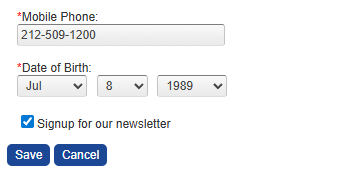 If selection remains, the winner will automatically be subscribed to the PromoSuite Mail list you configured.
Important Notes
- Winners are only added to your PromoSuite Mail list if they select the checkbox.
- The selected subscription list must already exist in PromoSuite Mail.
- This feature is only available for stations with an active PromoSuite Mail account.
Want to Learn More?
If you have questions about setting up winner opt-ins, PromoSuite Mail integrations, or growing your subscriber list, our Help Desk team is here to help.
Please contact us at:
Support@PromoSuite.com
Don’t Have PromoSuite Mail?
PromoSuite Mail helps stations grow and engage their audience with powerful email marketing tools designed specifically for broadcasters.
Interested in learning more?
Click here to learn more and book a demo!